Workspace
Overview
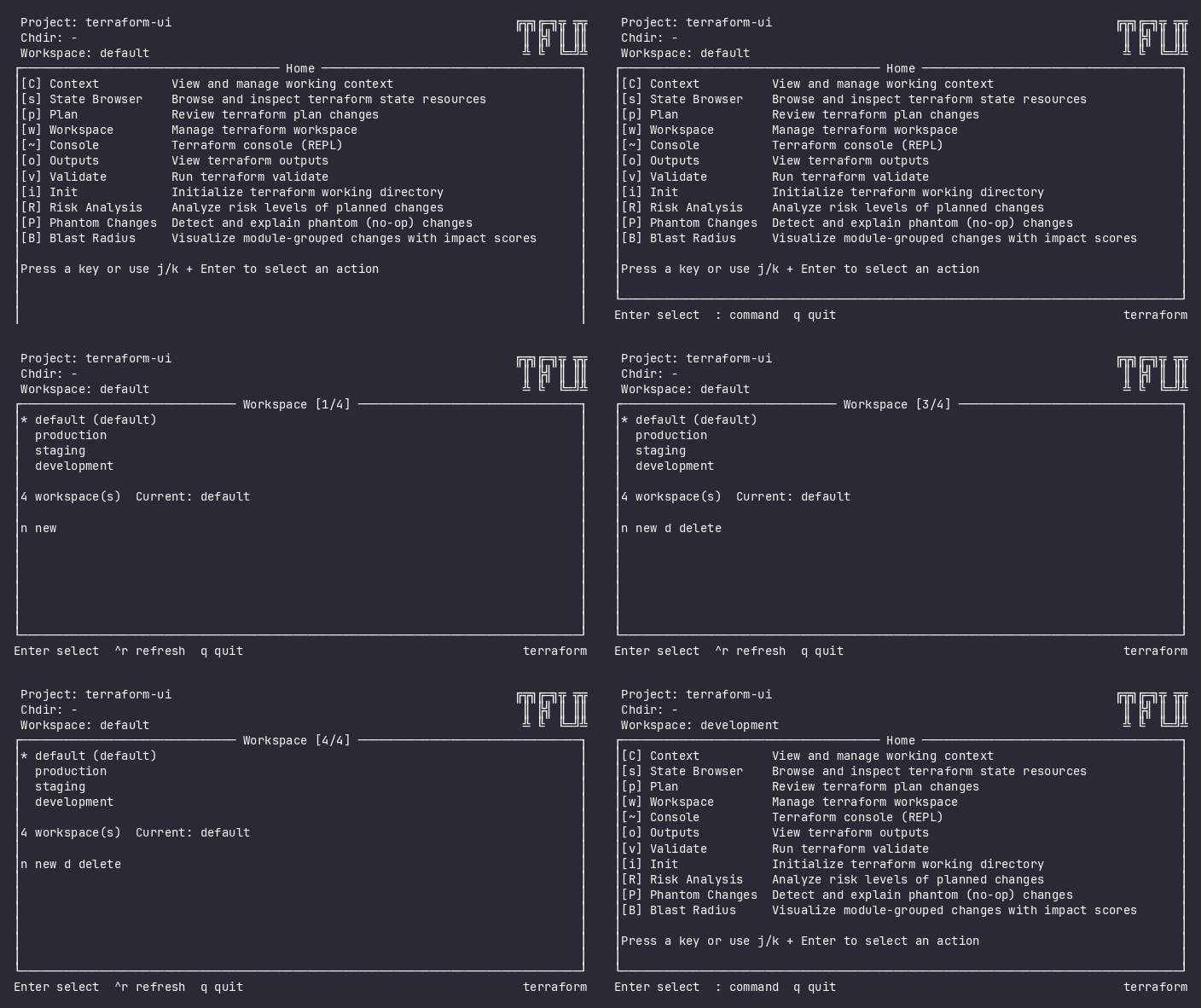
The Workspaces plugin lists all terraform workspaces, highlights the current one, and lets you switch between them, create new workspaces, or delete unused ones. The current workspace is marked with an asterisk.
Screenshot
Interactive (TUI)
Press w to open the Workspaces view. It loads the workspace list from the current terraform configuration.
Keybindings
| Key | Action | Context |
|---|---|---|
j / k |
Navigate up/down | List |
Enter |
Switch to selected workspace | List |
n |
Create a new workspace | List |
d |
Delete selected workspace | List |
r |
Refresh workspace list | List |
Esc |
Go back / cancel create | Always |
Flow
Home ──w──→ Workspaces (list)
               │
               ├── Enter → WorkspaceChangedEvent → pop back to origin
               ├── n → Input name → Enter → WorkspaceCreatedEvent
               ├── d → Confirm delete → deleted, refresh
               └── Esc → Cancel → pop back to origin
When creating a new workspace, type the name and press Enter to confirm or Esc to cancel.
Command Line (CLI)
tfui workspace show                    # Print current workspace name
tfui workspace list                    # List all workspaces (current marked with *)
tfui workspace select <name>           # Switch to workspace
tfui workspace new <name>              # Create and switch to workspace
tfui workspace delete <name>           # Delete workspace
| Flag | Applies to | Description |
|---|---|---|
-lock |
new, delete |
Lock state during operation (default: true) |
-lock-timeout |
new, delete |
Duration to wait for a state lock |
-force |
delete |
Force deletion of a non-empty workspace |
Exit Codes
| Code | Meaning |
|---|---|
| 0 | Operation succeeded |
| 1 | Operation failed |
Equivalence
| Goal | CLI | TUI |
|---|---|---|
| List workspaces | tfui workspace list |
Press w |
| Switch workspace | tfui workspace select <name> |
w → navigate → Enter |
| Create workspace | tfui workspace new <name> |
w → n → type name → Enter |
| Delete workspace | tfui workspace delete <name> |
w → navigate → d → confirm |
Configuration
# tfui.hcl
plugin "workspace" {
  enabled = true
}
Related
- State Browser – browse state for the selected workspace
- Context – manage project/chdir/workspace selection